
The familymind web app is here, and it changes everything
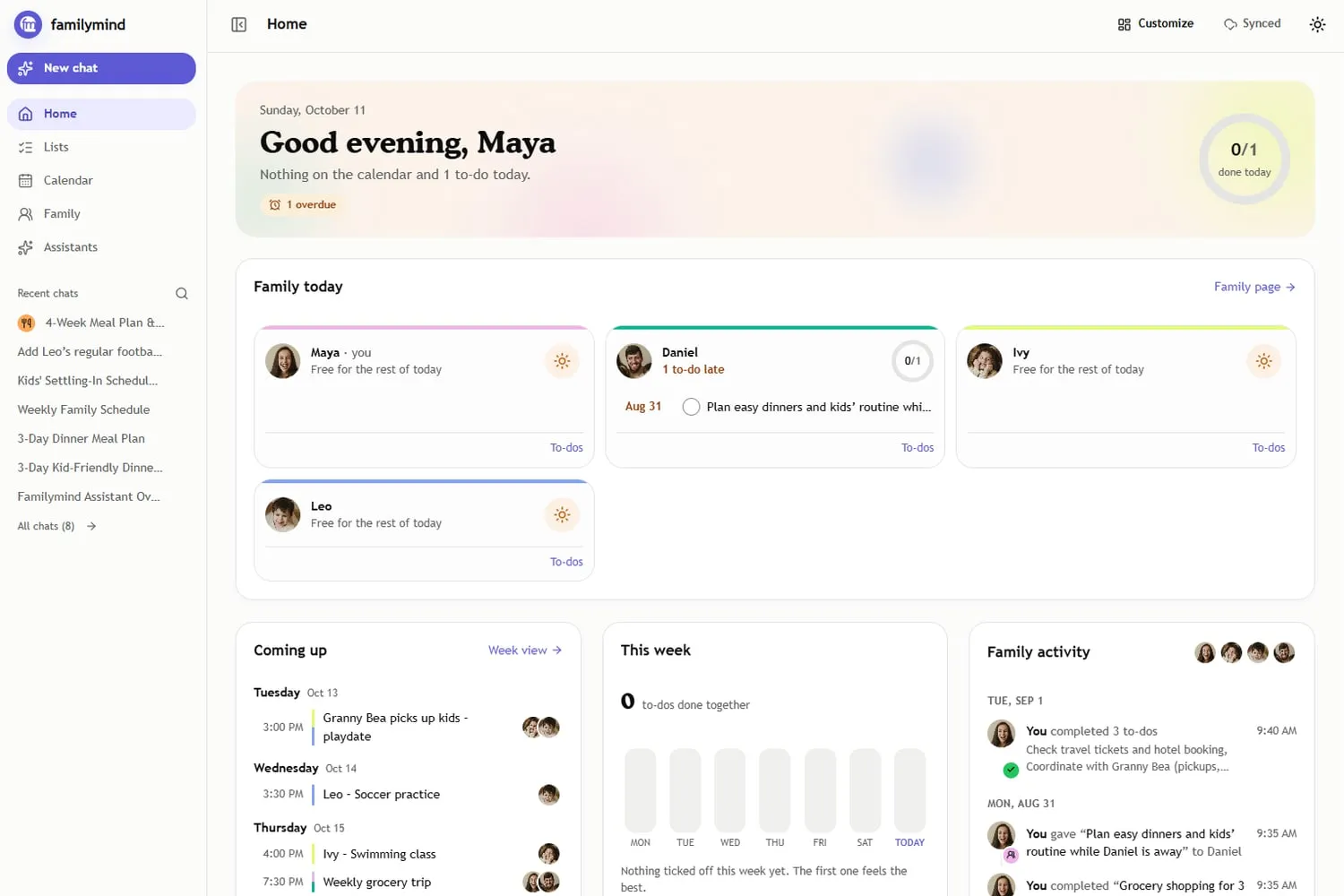
Today is a big day for us. familymind now runs in your browser, for every family. Open app.familymind.ai, sign in with the account you already have, and your whole family life is waiting for you on a big screen: your calendar, your lists, your meals and everything your assistants have learned about your family.
Last week our Premium families got the first look, and now it is open to everyone. My son loves it, and I am still a little amazed at what Mousa has pulled off every time I open it.
Why this is a game changer for working parents
Family life does not happen on a phone. It happens on the laptop at 10:40 on a Tuesday, when daycare writes that they close early on Friday and you are between two meetings. It happens in the kitchen at six, when everyone wants to know what tomorrow looks like. Until now, that meant grabbing your phone, replanning in a hurry, putting it away and picking it up again five minutes later.
The web app sits right where your day already is. During work it lives in a tab next to your inbox and your work calendar, so the family plan is one click away instead of one more thing on your mind. At home it turns the tablet on the counter into your family’s home base, the Home Hub we promised during our crowdfunding campaign. It is the same familymind as on your phone, it simply has the room it always deserved, and everything stays in sync both ways.
Your family’s day on one screen. Everyone has their own lane, and the ring at the top fills up as the day gets done.
A home screen that makes you smile
We did not want another dashboard that looks at you with a list of everything you still owe. So we built a home that celebrates with you.
The ring at the top fills up with every task your family ticks off, and when the day is done it lights up and tells you so. Every family member has their own lane and their own little ring, and when someone finishes their part, familymind cheers them on by name. “This week” shows how many tasks you have done together, as a family, day by day. And when nothing is ticked off yet on a Monday morning, it simply reminds you that the first one feels the best.
These are small things, and they are on purpose. Seeing that the load was shared today, and seeing it together in the evening, does something that a checklist never did.
The web app does not ask you to do more. It shows you how much you already carried together, and that changes the mood in the whole house.
Everyone gets a place, the kids too
Every family member has a lane, and that includes children without a phone. A six-year-old can see that she has daycare at 8:00 and that it is her turn to set the table. Parents see what is on for each child today and what comes first tomorrow, so the morning starts without the usual round of questions.
On the family page you see everyone together, with how long you have been a family and how many days are left until the next birthday. Partners who have not joined yet are one click away. familymind gently reminds you when your partner is missing, because the week really is lighter when two people carry it.
Mia makes dinner a family decision
Mia, our meal planning assistant, has been rebuilt from the ground up, and she shines on the big screen. She keeps your family cookbook, plans the week with a shopping list built from what is already in your fridge, and has her own meal calendar that shows who cooks what on which night. You drag a favourite dinner from the cookbook straight onto Wednesday, swap one when plans change, and the kids get to choose. We wrote more about her in meet the new Mia.
A fair view of who carries what
Even shows each adult the tasks they own and the ones they finished over the last four weeks. Nobody gets ranked. When the load tips to one side, Even suggests one trade at a time, so the conversation starts with something concrete instead of a feeling. Some conversations need preparing first, and for those there is a private space that no one else in the family can see.
The Mental Load Shift, levelled up
This is the part I am most excited about. In The Mental Load Shift, families look closely at who carries what in their heads, sharing it out again and making the new split stick. The exercises have always happened in the app. With the web app, the weekly check-in becomes something you do side by side, on one big screen, looking at the same lanes, the same week and Even’s fair view together instead of passing a phone back and forth. That is exactly the moment where a new split either holds or quietly slides back, and now it has a proper home.
Open your family's home base
Sign in with your familymind account on your laptop or tablet. Everything is already there.
Open the web appYour calendars, in sync both ways
familymind syncs two ways with Google Calendar and Apple Calendar. What you add in familymind appears in your calendar, and what you add in your calendar appears in familymind. For Outlook and every other calendar, familymind publishes a calendar link, so the family plan shows up wherever you already look. Google Calendar connects right in the browser, and Apple calendars are connected once in the iPhone app and then appear on the web as well.
How to start today
- Open the web app. Go to app.familymind.ai on your laptop or tablet.
- Sign in. Use the account you already have. New here? Creating one takes a minute.
- Bring your partner in. The mental load can only be shared when you both see what is coming up. The invite is one click on the family page.
- Put it where your family is. Keep a tab open at work and the tablet on the kitchen counter, which is where the web app really comes alive.
The free version lets you try all of this. Premium unlocks the assistants for everyday use, full calendar sync and suggestions before you ask, and one subscription covers your whole family. You can upgrade right inside the web app, and our pricing page has the details.
We built familymind so that the person who carries everything finally gets to put some of it down. The web app is the biggest step towards that we have taken so far. Try it tonight, show it to your family, and tell me what made you smile. I read every message.
Frequently asked questions
Is the familymind web app free?
Yes. Every family can open the web app at app.familymind.ai and try everything in the free version. Premium unlocks the assistants for everyday use, full calendar sync and suggestions before you ask, and one subscription covers the whole family.
Do I need a new account for the web app?
No. You sign in with the account you already use on your phone, and your calendar, lists and everything your assistants know about your family is already there. The web app and the mobile apps stay in sync.
Does the web app sync with my calendar?
Yes. familymind syncs two ways with Google Calendar and Apple Calendar, and it publishes a calendar link for every other calendar, such as Outlook. Google Calendar can be connected right in the browser; Apple calendars are connected once in the iPhone app and then show up on the web too.
Can children use the familymind web app?
Yes. Every family member gets their own lane on the home screen, children included, even if they don't have a phone. On a tablet in the kitchen, everyone can see what is on today and tick off their part.
 Company News
We made it to the radio, now you decide.
We've been selected to pitch on Radio Gong 96.3 Munich as part of their prestigious "Die 100.000 Euro-Idee" startup contest. The winner is chosen by the
 Company News
Why We Are Launching a Crowdfunding Campaign
Family life has never been more demanding. Parents today manage careers, emotional care, school logistics, medical appointments, social planning, relationship